























The Best Smart Ring Features for Busy Professionals
A long workday does not end when you close the laptop. For most professionals the same body that sat through eight hours of meetings also has to train, travel, and sleep — and the only device that can follow all three without asking for attention is a ring.
That is the real promise of a smart ring for working people. It is not more features. It is the removal of the one feature every other wearable is built around: a screen.
Quick answer: for a busy professional, five features matter most — sleep tracking, activity tracking, heart-rate and HRV signals, all-day comfort, and multi-day battery. Two more are tie-breakers: no subscription and water resistance. Everything else on a spec sheet is secondary. The honest limits: a smart ring cannot replace a chest strap for training accuracy, cannot answer your email, and cannot tell you why you are stressed — only that your body is carrying more load than usual.
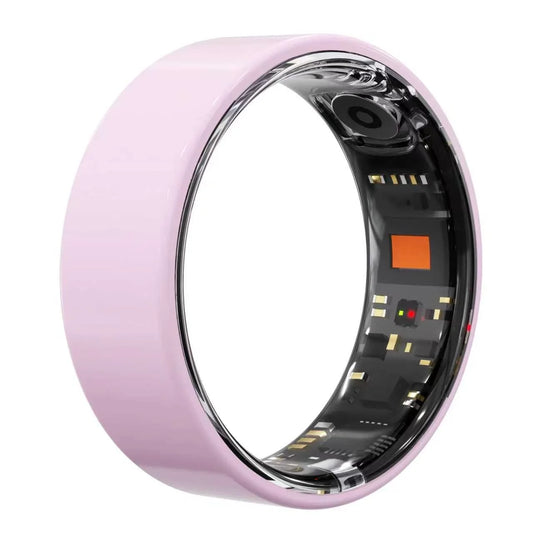
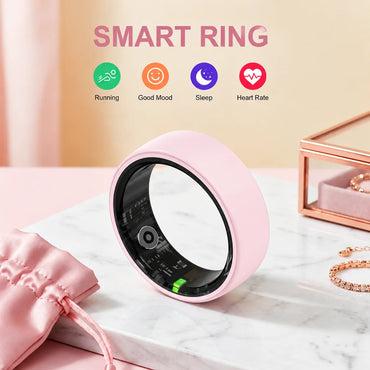
Osawalla makes two: the Signature Pro Smart Ring ($49.99, brushed steel) and the Ceramic Pro Smart Ring ($69.99, zirconia ceramic). Both share the same sensor stack, 5–7 day battery, and no-subscription app; they differ in material, weight, and finish. Below is which features actually earn their place on a workday — and where every smart ring, ours included, falls short.
What a smart ring actually does for a workday
Four things, none of which interrupt you:
· Records sleep automatically. No charging dock to remember, no button to press at bedtime.
· Counts movement while you sit still. The problem a ring solves is not the gym — it is the 10 hours between gyms.
· Shows physiological load. Heart rate, HRV, temperature, and blood oxygen trends tell you when a "normal" week is costing more than it should.
· Stays invisible. No screen, no vibration, no badge of tech on your wrist in a client meeting.
What it does not do: replace your phone for anything requiring a screen, replace a fitness watch for live pace and distance, or replace a doctor for anything that feels wrong. Those boundaries are not hedging — they are where the hardware genuinely stops. Our guide to smart ring health tracking beyond sleep covers what the sensors can and cannot measure.
1. Sleep tracking: the productivity input nobody schedules
This is the feature professionals underestimate and the one a smart ring does best.
The CDC recommends 7 or more hours of sleep for adults and links insufficient sleep to reduced attention, memory, and next-day performance — the three things a workday runs on. The reason most professionals do not track sleep is friction: a watch has to be charged and worn to bed, and most people take it off. A ring removes the friction because you are already wearing it.
Our Ceramic Pro sample measured 4.1 g at size 9 on our scale — light enough that after two or three nights you stop noticing it, which is the entire point. Our stainless steel comparison sample measured 6.8 g in the same size. At 2 a.m., that 2.7-gram difference is the difference between a ring you keep on and a ring on the nightstand.
The honest way to use the data: do not chase single-night scores. One bad night is noise. The pattern that matters is what happens across a workweek — whether you average 7.5 hours from Sunday to Wednesday and drop to 6 during deadline crunch, or whether late-night screen time shows up as a later sleep onset for three days running. In our own wear logs, the clearest signal was never the score — it was the gap between "weeks I said were fine" and weeks the ring said I was under six hours.
For the full explanation of how a ring detects sleep stages without a lab, read our sleep tracking science guide.
One honest caveat: rings estimate sleep from movement and heart rate. They are good at total duration and consistency, weaker at distinguishing light sleep stages. Use them for trends, not for diagnosing yourself.
2. Activity tracking for desk workers
The WHO recommends at least 150 minutes of moderate physical activity per week for adults and, just as importantly, warns against long uninterrupted sedentary time. For a professional, the hard part is not the 150 minutes — it is the other 10,000 minutes at a desk.
Activity tracking earns its place here not by coaching you, but by making the gap visible. The pattern most desk workers find in their first month is not "I don't exercise" — it is "on meeting-heavy days I stop moving entirely between 9 a.m. and 7 p.m., even on days I trained in the morning."
A smart ring tracks this passively: steps, active time, and daily movement totals, all without a screen nagging you mid-meeting. The data shows up later in the app, where it belongs.
What it is not: a calorie counter you should trust to the digit. Rings estimate daily burn from movement and heart rate; the error bars are wide enough that the number is useful as a comparison against your own baseline, not as a figure to eat by. Our explainer on how wearables estimate calorie burn covers why.
The professional's version of this feature: use your activity trend as a proxy for meeting load. When your steps collapse three days in a row, that is your calendar telling you something — not the ring.
3. Heart rate and HRV: the load you can't see
Resting heart rate and heart-rate variability (HRV) are the closest thing wearables have to a "how hard is your life right now" gauge. For professionals, their value is not athletic — it is detecting the difference between a busy week and an overloaded one before you feel it.
The Signature Pro and Ceramic Pro both track heart rate, HRV, blood oxygen, and skin temperature continuously — the full sensor list is on the product page. The pattern that matters to a professional is directional: a resting heart rate that creeps up 5 bpm across a deadline week, or HRV that stays suppressed after two nights of short sleep.
Two honesty notes that belong in every smart ring review:
1. A ring is not a chest strap. Optical sensors on a finger are excellent for resting and overnight trends, weaker during fast heart-rate changes like sprints or heavy intervals. If you train seriously, use a strap for sessions and the ring for recovery. Our heart rate accuracy breakdown explains the physics.
2. SpO2 is a trend signal, not a medical one. Wearable blood oxygen readings are useful for spotting dips (worth asking a doctor about, for example with snoring), not for making medical decisions.
And the necessary disclaimer: none of this is medical information. If your data consistently worries you, the correct next step is a healthcare professional, not more data.
4. The features that sound boring but decide whether you keep wearing it
Ask anyone who has owned a wearable for a year what determines whether it survives the drawer test. It is never the sensor list.
Weight and thickness. Our Ceramic Pro measures 2.6 mm at the sensor housing and 4.1 g at size 9; the steel Signature Pro is thicker and heavier. Across a 14-hour day, that is the difference between "invisible" and "I notice it when I type." We compared both materials directly in our ceramic vs metal smart ring guide.
Sizing. A ring you cannot resize is a ring you must size correctly once. Finger size changes across the day and the seasons — our size guide and how to choose between sizes walk through it, and a sizing kit exists precisely because guessing is the most common mistake. If you are between sizes on a ceramic ring, size up — ceramic cannot be adjusted later.
Battery. Both Osawalla rings list 5–7 days. In practice that means one charge a week, on the same day, at the same time — a habit, not an event. The charging case holds 400 mAh, so a top-up does not require a wall socket — useful on a business trip when the desk has no free outlet. (More on the case in our charging case explainer.)
Water resistance. The Signature Pro is IP68-rated — hand-washing, showering, and pool swimming are fine. What IP68 does not cover is hot water: saunas and hot tubs degrade the seals, and that is a slow death rather than an immediate failure.
No subscription. Both rings work without a monthly fee for the core tracking. For a professional evaluating total cost of ownership, that changes the math: the Signature Pro is $49.99 once, not $X per month forever. We wrote about why that matters and maintain a list of smart rings without subscriptions.
5. Travel-proof tracking
A smart ring is one of the few wearables that travels better than it stays home.
Airport security does not care about it. It does not come off at the checkpoint. It does not need a charger on a four-day trip if you left with a full battery. And because it has no screen, it does not become one more glowing device in a hotel room.
For professionals who travel for work, the most useful data is comparative: your sleep at home versus your sleep on the road, your movement in a conference week versus a normal one. The changes are usually larger than expected, and they are the difference between landing on a Friday feeling flat and landing recovered.
If your travel involves a lot of hands-free capture or translation, that is a different device — we compared the options in our smart glasses for travel guide. The two products are complementary, not competitors: the ring tracks you; the glasses interact with the world.
What a smart ring does NOT do well
This is the section most buying guides skip, and it is the one that decides whether you regret the purchase.
It cannot show you anything in real time. No screen means no glanceable pace, no notifications, no "your heart rate is 140 right now." If you want that, you want a watch — our smart ring vs smartwatch comparison covers the trade-off honestly.
It cannot replace a chest strap for training. Covered above, but it bears repeating: if your workouts involve fast heart-rate changes and you care about zone accuracy, the ring is your recovery tool, not your training tool.
Ceramic is beautiful and brittle. The Ceramic Pro's zirconia is hard and scratch-resistant, but it can chip on a hard impact where steel would dent. We dropped a ceramic sample onto tile during testing and it chipped at the edge — permanently. Details in our ceramic material guide.
You cannot resize it. Both materials. Get the size right the first time, use the sizing kit, and if in doubt size up.
It will not tell you why. A suppressed HRV trend after three nights of poor sleep tells you that your body is carrying load. It does not tell you whether the cause is work, illness, alcohol, or a new mattress. The ring is a signal, not an explanation.
It is not a medical device. All readings are wellness-grade. They are excellent for patterns and entirely unsuitable for diagnosis.
Smart ring vs smartwatch for professionals
The comparison professionals actually want, in one table:
|
|
Smart ring |
Smartwatch |
|
Screen |
None — the point |
Yes — also the point |
|
All-day comfort |
4–7 g, invisible |
30–60 g on a wrist |
|
Sleep tracking |
Excellent (no bulk) |
Good (many take it off) |
|
Battery |
5–7 days |
1–3 days |
|
Live data |
No |
Yes — pace, HR, notifications |
|
Notifications |
None |
Constant |
|
Meeting appropriateness |
Looks like jewelry |
Looks like a device |
|
Training accuracy |
Recovery-grade |
Session-grade |
|
Best for a professional |
Passive, long-term wellness |
Active, interactive use |
The honest summary: they are not competitors, they are different jobs. A watch is for interacting; a ring is for not interacting. Some professionals wear both — watch by day, ring at night — and that combination covers everything. Our deeper comparison is in smart ring vs smartwatch and smart ring vs fitness tracker.
The two Osawalla rings, compared for professional use
Both share the same sensor stack (heart rate, HRV, SpO2, temperature, sleep, activity), the same 5–7 day battery, IP68/5ATM-class water resistance, and no-subscription app. The difference is material, weight, and appearance:
|
|
||
|
Price |
$49.99 |
$69.99 |
|
Material |
Brushed stainless steel |
Zirconia ceramic |
|
Weight |
Heavier (metal) |
~4 g, the lighter option |
|
Scratch resistance |
Good (brushed finish hides wear) |
Excellent (very hard surface) |
|
Impact resistance |
Excellent |
Lower — can chip on hard knocks |
|
Colors |
Black, silver, gold, rose gold |
Blush pink |
|
Sizes |
7 sizes |
7 sizes |
|
Looks like |
A modern ring |
Fine jewelry |
|
Best for |
Everyday wear, knocks and gym bags |
A refined look, scratch-heavy environments |
For a professional, the choice usually comes down to one question: will you wear it with a suit, and does it need to survive a gym bag? The Ceramic Pro wins the first, the Signature Pro wins the second. Our full Osawalla ring comparison and the Signature Pro review go deeper. Warranty and returns are a 1-year warranty and 30-day returns; shipping terms are here.
How to actually use the data (the 5-minute morning routine)
The professionals who get value from a smart ring all do the same simple thing. They do not check it during the day. They check it once, in the morning, for five minutes:
3. Glance at last night's sleep duration. Not the score — the duration. Under 6.5 hours means today is a light-load day if you can make it one.
4. Check resting heart rate trend. If it is elevated three mornings running, something is loading you — sleep debt, stress, or the start of illness.
5. Look at yesterday's movement. If it was a meeting-heavy day and your steps collapsed, today needs a deliberate walk, scheduled like a meeting.
6. Close the app. The ring's job is done until tomorrow.
That is the entire routine. The value is not in the data — it is in the small daily adjustment the data makes possible. For syncing with Apple Health or Strava, our setup checklist covers what to verify.
 The short version
· The five features that matter for professionals: sleep tracking, activity tracking, HRV signals, all-day comfort, and multi-day battery. Everything else is secondary.
· The two tie-breakers: no subscription and water resistance — both change the long-term cost of ownership.
· The honest limits: no real-time screen, not a chest strap, ceramic is brittle, cannot be resized, and wellness-grade data is not medical data.
· The one habit that makes it worthwhile: a five-minute morning check of sleep, resting heart rate, and yesterday's movement. Nothing else is required.
· Our own products, disclosed: the Signature Pro at $49.99 (steel, everyday) and the Ceramic Pro at $69.99 (ceramic, refined), both 5–7 day battery and no subscription. Its weaknesses are the category's weaknesses.
Your schedule will stay busy. The point of a good smart ring is that it does not make it busier.
Frequently asked questions
What are the most important smart ring features for busy professionals?
Sleep tracking, activity tracking, heart-rate and HRV trends, all-day comfort, and multi-day battery. These five determine whether the ring survives the drawer test; everything else is secondary. No subscription and water resistance are the two tie-breakers.
Can a smart ring actually help with productivity?
Indirectly, yes. A ring does not manage your tasks — it shows you the physiological inputs your workday runs on: sleep duration, movement, and recovery load. The productivity gain comes from the small daily adjustments that data makes possible, not from the device itself.
Is a smart ring better than a smartwatch for a professional?
They do different jobs. A watch is for interacting — notifications, live pace, a screen. A ring is for not interacting — passive, long-term wellness tracking you never have to think about. Many professionals wear both; the combination covers everything. Our full comparison covers the trade-offs.
Should I wear a smart ring while sleeping?
Yes — overnight is where a smart ring earns its keep. Sleep tracking is its strongest feature precisely because a 4-gram ring is comfortable enough to forget about, which is what makes continuous overnight data possible at all.
Are smart ring health measurements medical information?
No. All readings are wellness-grade trends, not medical data. They are excellent for spotting patterns (for example, a rising resting heart rate across a stressful week) and entirely unsuitable for diagnosis. If your data concerns you, consult a qualified healthcare professional.
Which Osawalla smart ring is better for professionals?
The Signature Pro ($49.99) if your day involves knocks, a gym bag, or you want steel durability at a lower price. The Ceramic Pro ($69.99) if you want the lighter, more jewelry-like option and can accept that ceramic chips on hard impact. Both share the same sensors, 5–7 day battery, and no subscription.
What is the biggest downside of a smart ring for work?
The absence of a screen. A ring cannot show you anything in real time — no notifications, no live heart rate, no glanceable data. That is a feature for people drowning in screens and a genuine limitation for anyone who wants live feedback.
Do smart rings need a subscription?
Ours do not. Both Osawalla rings work without a monthly fee for the core tracking experience. Across the category, some competitors gate features behind subscriptions, so verify before buying — our subscription comparison covers why it changes the total cost of ownership.


