























Can Smart Rings Sync With Apple Health and Strava? What to Check Before Buying
By the Osawalla Product Team · Last updated: September 2026
Yes — a smart ring can sync with Apple Health, and it can sync with Strava. But the two integrations follow different rules, and neither one works automatically in every direction.
Here is the short version:
· Your ring writes to its companion app first.
· The app then shares selected categories with Apple Health, after you grant permission.
· Strava imports workouts recorded in Apple's own Workout app. Activities that a third-party app pushed into Apple Health generally will not travel onward to Strava.
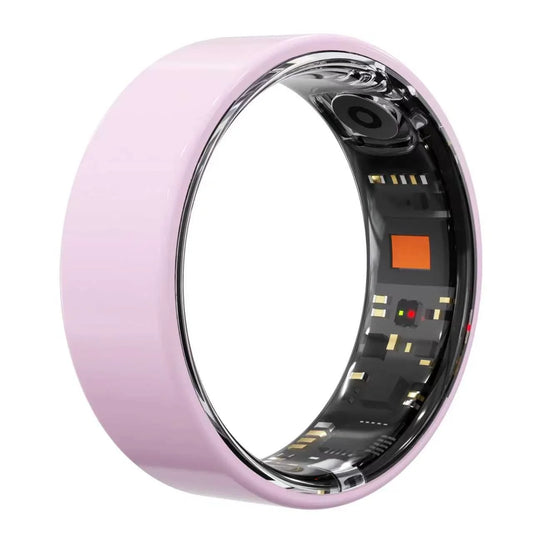
That's why "Apple Health compatible" and "works with Strava" are two separate claims, and a ring that passes one can quietly fail the other. Below: what actually syncs, what doesn't, and how the Osawalla Signature Pro Smart Ring handles both.
 How Smart Ring → Apple Health Sync Actually Works
Apple Health is not a direct destination for your ring. It is a hub that third-party apps write into, and the chain almost always looks like this:
Smart ring → companion app → Apple Health
The ring's sensors record raw data. The companion app processes it into steps, sleep stages, heart rate and so on. Only then can the app write those values into Apple Health — and only for the categories you explicitly allow.
Apple lets you review and revoke this access at any time in Health → Sharing → Apps, where you can set each app to read or write specific categories. (Apple Support)
The practical consequence: "Apple Health compatible" tells you the door exists. It does not tell you which rooms are behind it. Two rings can both claim Apple Health support while syncing completely different sets of data.
|
Data type |
Typically syncs to Apple Health |
Why it matters |
|
Steps |
Yes |
Fills your Activity rings and daily trend |
|
Distance |
Yes |
Walking and running records |
|
Active calories |
Yes |
Energy balance tracking |
|
Heart rate |
Yes |
Resting and daily cardiovascular trends |
|
Sleep |
Usually, as sleep analysis |
Sleep duration and stage breakdown |
|
Workouts |
Depends on the app |
This is where most rings diverge |
|
HRV / SpO₂ / stress |
Varies by app |
Not every ring maps these to Health categories |
How Strava Sync Works — and the Catch Most Buyers Miss
Strava is built around activities, not around all-day wellness data. Its Apple Health integration is real, but it is narrower than most people assume.
According to Strava's own help center, only activities recorded with Apple's native Workout app sync to Strava through Apple Health, and activities uploaded to Apple Health from a third-party app will not sync. Strava activities can, in the other direction, be written into Apple Health.
This breaks the assumption a lot of buyers make:
❌ Smart ring → Apple Health → Strava — does not reliably work for workouts.
✅ Companion app → direct Strava binding — the path that does work, when the app offers it.
So the question to ask before buying is not "does it support Apple Health?" but "does the companion app offer its own Strava connection, or does it only write to Apple Health?" Those two answers lead to very different results.
How to Set Up Apple Health and Strava Sync on the Signature Pro
The Signature Pro connects through the Da Rings app (App Store · Google Play). Setup takes about two minutes:
1. Pair the ring. Open Da Rings, add the Signature Pro, and let it finish its first sync.
2. Turn on Apple Health sharing. Inside Da Rings, open the profile / third-party access settings and enable Apple Health. iOS will show a permission sheet listing every category — switch on the ones you want (steps, sleep, heart rate, active energy, workouts).
3. Verify it landed. Open the Apple Health app and check the corresponding categories for today's data. If a category is empty, the toggle for it is off.
4. Bind Strava for workouts. In Da Rings, go to the Strava binding option and sign in with your Strava account. This is a direct connection — it does not go through Apple Health.
5. Record and check. Start a GPS activity from the app (walking, running, outdoor cycling, trail running, hiking), finish it, and confirm it appears in your Strava feed.

What the Signature Pro Tracks
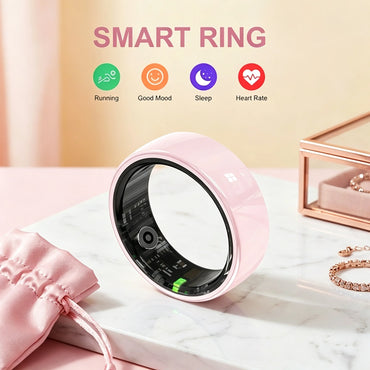
The app is where the full picture lives, including heart rate, HRV, blood oxygen, stress, sleep, steps, distance, calories, workouts, readiness and cycle tracking. Two areas are worth a closer look because they generate the most questions:
Sleep. The ring records sleep duration, stages, sleep heart rate, average HRV, nighttime SpO₂ (which you enable manually), naps and bedtime consistency. If sleep is your main reason for buying, see how a smart ring tracks sleep.
Blood oxygen. Spot readings, historical SpO₂ trends and optional overnight monitoring. The measurement principle is explained in our SpO₂ guide.
Everything else — steps, distance, active calories, goal completion and effective activity time — feeds the daily activity view and the heart-rate, HRV and SpO₂ history you can export or share.
What Doesn't Sync (Read This Before You Buy)
Being straight about the gaps is the fastest way to avoid a return:
· Not every metric has an Apple Health category. A ring can measure something that Apple Health has no equivalent field for, or that the app developer hasn't mapped yet. Blood pressure is a common example — some users report seeing it in Da Rings but not in Apple Health.
· Apple Health is not a router to Strava. Writing steps or sleep to Health does not push workouts to Strava. Use the in-app Strava binding instead.
· Sleep and HRV are wellness trends, not clinical measurements. Night-to-night values move with alcohol, late meals, room temperature and travel.
· Android users get a different path. There is no Apple Health on Android; the companion app plus Google's health platform is the equivalent route.
Specifications
Source: the Signature Pro product page.
|
Specification |
Osawalla Signature Pro |
|
Material |
Stainless steel |
|
Colors |
6 finishes — Silver, Gold, Black, Brushed Silver, Brushed Rose Gold, Brushed Black |
|
Sizes |
#6–#13 |
|
Battery life |
Up to 5–7 days per charge |
|
Charging |
Magnetic charging, ~1 hour to full |
|
Water resistance |
IP68 |
|
Bluetooth |
BLE 5.3 |
|
Compatibility |
Android 5.0+ / iOS 12.0+ |
|
Companion app |
Da Rings — free, no subscription |
|
Apple Health |
Supported via Da Rings |
|
Strava |
Binding supported inside Da Rings |
|
Price |
$49.99, one-time |
Smart Ring Cost and Subscription Comparison
Sync support is one thing; what it costs to keep is another. Most rings that lead on integrations also charge a monthly fee to unlock the analysis — which means the data you carefully routed into Apple Health and Strava sits behind a paywall in the app you started from.
|
Ring |
One-time price |
Subscription |
3-year cost |
Apple Health |
Strav |
|
Osawalla Signature Pro |
$49.99 |
$0 |
$49.99 |
Yes, via Da Rings |
Yes, in-app binding |
|
Oura Ring 4 |
~$299–349 |
$5.99/mo |
~$515–565 |
Yes |
Yes |
|
Samsung Galaxy Ring |
~$399 |
$0 |
~$399 |
Android-first |
Limited |
|
RingConn Gen 2 |
~$279–299 |
$0 |
~$279–299 |
Yes |
— |
|
Ultrahuman Ring Air |
~$349 |
$0 |
~$349 |
Yes |
Yes |
Five Things to Check Before You Buy
6. Does the companion app write to Apple Health — and which categories? Not just the claim; check the permission list.
7. Is Strava connected directly, or only through Apple Health? Only the direct binding reliably moves workouts.
8. Which of the metrics you care about actually have a destination? Steps and sleep usually do; HRV, SpO₂ and blood pressure often don't.
9. Is it automatic or manual? Some apps push continuously after one authorization; others need a manual export per activity.
10. Does the app still hold value on its own? Ring-specific reports, cycle tracking and readiness scores usually never leave the app.
 FAQ
FAQ
Does the Osawalla Signature Pro sync with Apple Health?
Yes. Enable Apple Health sharing inside the Da Rings app and grant the categories you want. The data flows ring → Da Rings → Apple Health; the ring itself does not connect to Health directly.
Does it sync to Strava automatically?
Workouts recorded in Da Rings sync to Strava once you bind your Strava account in the app. They do not reach Strava by passing through Apple Health — Strava's Apple Health import only accepts activities recorded in Apple's native Workout app.
Why didn't my ring workout show up in Strava?
In most cases the workout was written to Apple Health but no Strava binding exists in the companion app. Check the binding status in Da Rings, and confirm the activity was finished and uploaded rather than left open.
Do steps and sleep go to Apple Health?
Yes, if you switched those categories on during authorization. If a category is empty in Apple Health, revisit Health → Sharing → Apps and enable it there.
Is there a subscription fee?
No. The Signature Pro is $49.99 once, and the Da Rings app has no monthly fee.
The Bottom Line
Don't shop for a sensor list. Shop for a data path.
The ring collects. The app decides what to share. Apple Health stores what it's given. Strava takes workouts — from its own binding, not from Health. If those four layers line up with how you already track your day, the ring earns its place; if they don't, no number of sensors fixes it.
Explore the Osawalla Signature Pro Smart Ring →
More reading: Signature Pro review: no subscription, 5–7 day battery · 6 core features of smart rings · Osawalla smart rings vs ordinary smart rings
The Osawalla Signature Pro is a wellness device, not a medical device. It is not intended to diagnose, treat, cure, or monitor any disease. Heart rate, HRV, SpO₂, stress, sleep and cycle data are for general wellness and informational purposes only; consult a qualified healthcare professional for any medical concern.


