























How to Clean a Smart Ring (Without Damaging the Sensors)
Quick answer — how to clean a smart ring: Take it off, rinse under lukewarm water, use a drop of mild dish soap if there's buildup, wipe the inner sensor area with a soft lint-free cloth, rinse again, then dry it completely before wearing or charging. Weekly, or right after a sweaty workout. Skip alcohol, solvents, abrasive pads and sharp tools.
A smart ring sits against your skin for hours at a time. Sweat, skin oils, sunscreen and hand lotion slowly build up on both the outside and the inside — and the inside is where the sensors live.
This guide covers how to clean a smart ring safely, how often to do it, and what to avoid — whether you want to clean a health ring, a sleep tracker or a fitness band — plus how everyday care differs between the Osawalla Signature Pro Smart Ring, Oura and RingConn.
Why cleaning your smart ring matters
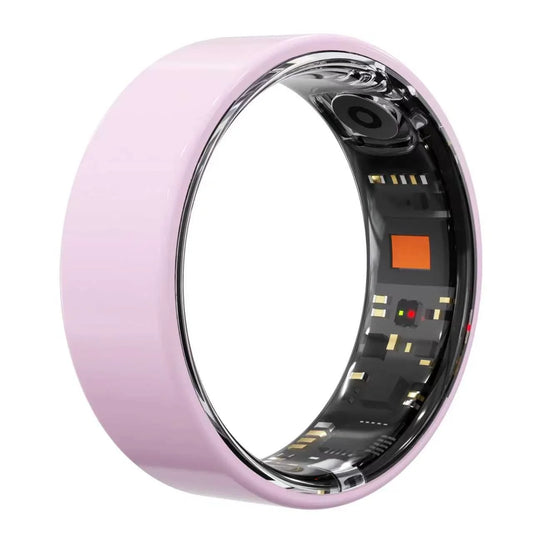
The inside of a smart ring isn't jewellery. It holds the LEDs and photodiode that read your pulse, plus the temperature sensor and accelerometer behind them.
Residue doesn't break anything. It just sits between the sensor window and your skin, and the ring has to read through it. It also traps moisture against your finger, which gets uncomfortable fast in warm weather.
Oura asks owners to clean the infrared LED sensors on the inside of the ring about once a week, and says dust and dirt can interfere with the signal between sensor and artery (Oura: Caring for Your Oura Product). RingConn frames it the same way: regular cleaning keeps readings accurate and stops residue interacting with the sensors (RingConn: How to Maintain Your Smart Ring).
Two minutes a week is the whole job.
How to clean a smart ring: 5 safe steps

Step 1: Take the ring off
Clean it off the finger, not on. You need to see the sensor window, and removing it lets you check what has actually collected inside the band — usually a grey film of dried sweat and soap.
Step 2: Rinse with lukewarm water
Run it under clean lukewarm water, roughly 30–40 °C (86–104 °F). Not hot, and no sudden temperature swings: the seals and the battery both dislike thermal shock.
This one rinse removes most loose grit. Often it's enough on its own.
Step 3: Add a drop of mild soap if there's buildup
One small drop of mild dish soap, worked in with your fingers or a cloth. That's it — no soaking, no scrub, no cleaning bath.
Dish soap is the right choice because it's formulated to cut grease without solvents, which is exactly what skin oil is. Oura says the same: a little mild dish soap and water, then dry thoroughly.
Step 4: Wipe the sensor area
Now the part that matters. Use a soft, lint-free cloth — a microfibre glasses cloth is ideal — and wipe the inner surface and the sensor window.
Cotton buds work for the seams around the sensors. Dampen, don't soak, and let the bud do the work rather than pressing hard.
Step 5: Dry it completely before it goes back on or on the charger
Dry the whole ring, then go over the inside again. Pay attention to the recesses around the sensors, where water sits.
Cleaning and charging are two separate steps. A damp ring on a charger is a corrosion risk and, in practice, the most common reason a ring "won't charge" — moisture and residue on the contacts interrupt the circuit. More on that below.
How to clean smart ring sensors: what to use, what to avoid
Ring sensor cleaning is where people do the damage. The rule is simple: the sensors need to be clean, not polished.
Safe to use:
· Soft lint-free or microfibre cloth (your first choice, nearly always sufficient)
· Cotton bud, lightly dampened, for seams and corners
· Lukewarm water
· A single drop of mild dish soap
· A dry, soft-bristled toothbrush for caked-on grime in the seams — dry only, and gently
· Canned air, held back a few centimetres, for dust
Do not use:
· Abrasive powders, scouring pads, magic sponges
· Metal brushes or anything with a sharp edge
· Needles, pins, toothpicks or knives in the sensor recesses
· Solvents: acetone, bleach, ammonia, strong degreasers
· Ultrasonic jewellery cleaners — the cavitation that lifts dirt off a wedding ring also drives water past seals
· Polishing compounds not approved for your model
Two grey areas worth knowing:
Alcohol and hand sanitiser. Oura states its ring can safely come into contact with hand sanitiser. That's surface contact, not a soak — and other brands don't all publish the same tolerance. If you're unsure about your model, soap and water is the safe default.
Disinfectant wipes. Convenient, but they carry solvents and surfactants beyond plain soap. Occasional use is probably fine; daily use on a sensor window isn't worth the gamble.
RingConn's guidance is blunt about the rest: soap and water are fine, but strong cleaners like bleach can harm both the materials and the sensors.
How often should you clean a smart ring?
Weekly is a sensible baseline for a ring you wear continuously. Adjust upward rather than agonising over the schedule.
|
When |
What to do |
Why |
|
Daily |
Glance at the inside of the band |
Catches tacky residue before it hardens |
|
After heavy sweating |
Rinse and dry |
Sweat salts sit on the seals |
|
Weekly |
Full clean: soap, sensor window, rinse, dry |
The baseline Oura recommends |
|
Monthly |
Wipe the charging contacts |
Prevents "won't charge" |
|
Before every charge |
Check the ring is bone dry |
Moisture plus current equals corrosion |
|
Every few weeks |
Look for scratches or discolouration |
Early sign of seal wear |
Clean it more often if you:
· Train daily or sweat heavily
· Sleep in it every night
· Apply hand cream or sunscreen several times a day
· Work with dust, grease or oils
· Notice the inside feeling tacky
· See a visible film over the sensor window
After a genuinely sweaty session, rinse and dry the ring. Thirty seconds, done — and it's the single habit that most extends the life of the seals.
If you wear your ring at night, it's worth reading how a ring actually derives its numbers before you chase small changes in the data: how a smart ring tracks sleep.
Can you wash your hands or shower with a smart ring?
Both, within limits.
The Osawalla Signature Pro Smart Ring carries an IP68 rating. That rating describes static fresh water, typically to about 1.5 m for 30 minutes — a lab condition, not a promise about your bathroom.
What IP68 does not cover:
· Hot water, steam, saunas and hot tubs. RingConn explicitly warns that saunas and hot tubs can damage internal components, especially the battery and sensors. Heat also expands the seals.
· Salt water and chlorinated pools — both leave deposits and can creep past seals
· High-pressure jets
· Soap, shampoo and cleaning products left to dry on the surface
Handwashing is fine. What isn't fine is leaving soap residue trapped under the band, day after day. If your hands get properly soaped up, slip the ring off, or rinse under it and dry underneath afterwards. Want the full picture on what these devices do? Start with what a smart ring is.
Don't forget the charger: cleaning the charging contacts
Almost nobody cleans the charger. It's the most overlooked part of smart ring care — and it's the fix for the most common smart ring complaint.
Sweat and skin oil transfer from the ring to the charging contacts. Over weeks that film builds into an insulating layer. The ring sits on the dock, the light doesn't come on, and it looks like a dead battery. On a model like the Signature Pro, those are the three gold pads on the inside of the band — the same ones visible in the cutaway image above.
Once a month:
1. Unplug the charger.
2. Wipe the contact pads with a dry lint-free cloth.
3. For recessed contacts, use a dry cotton bud, then a lightly dampened one.
4. Let everything dry before plugging back in.
Then check the other half of the equation — the ring's own contacts, cleaned during your normal routine. If a ring still won't charge after both sides are clean, that's a support ticket, not a cleaning problem.
Smart ring maintenance: Osawalla vs Oura vs RingConn
The cleaning principle is universal. What differs is what you're maintaining, and what it costs you to keep.
|
|
Osawalla Signature Pro |
Oura Ring 4 |
RingConn |
|
Published water rating |
IP68 |
Water-resistant to ~100 m |
Water-resistant |
|
Cleaning method |
Lukewarm water, drop of mild soap, soft cloth |
Mild dish soap and water |
Soap and water, soft lint-free cloth |
|
Sensor care |
Wipe sensor window gently |
Clean inner sensors ~weekly |
Regular cleaning maintains accuracy |
|
Manufacturer warnings |
Dry fully before charging |
Avoid prolonged extreme temperatures |
Avoid harsh chemicals, bleach, saunas and hot tubs |
|
Hardware price |
$49.99 |
$349 |
Varies by generation |
|
App subscription |
None |
$5.99/mo or $69.99/yr |
None |
|
Three-year cost |
$49.99 |
≈ $559 |
Hardware only |
That last row is the one people miss. An Oura Ring 4 costs $349 up front plus roughly $70 a year for the membership — about $419 in year one and $559 over three years. The Osawalla Signature Pro is $49.99 once, with no subscription, ever.
Same cleaning cloth. About eleven times less money. If the subscription model is the thing putting you off a smart ring, here's why no-subscription matters — and how the 2026 field compares.
How to clean an Osawalla smart ring
That heading is the whole answer to how to clean Osawalla smart ring hardware: nothing brand-specific, no proprietary kit, no special solution. The six steps:
5. Take it off.
6. Rinse under lukewarm water.
7. One drop of mild dish soap if there's visible buildup.
8. Wipe the inner surface and sensor window with a soft cloth.
9. Rinse off the soap.
10. Dry completely — then wear it or charge it.
If the sensor window looks cloudy, give it an extra slow wipe instead of reaching for something sharper. Full specs are on the Osawalla Signature Pro Smart Ring product page.
Does cleaning improve sensor accuracy?
Smart ring sensor cleaning is maintenance, not calibration. It restores the conditions for accuracy; it doesn't create accuracy that was never there.
What actually moves the numbers:
· Fit. Too loose and the sensor window loses contact; too tight and it restricts blood flow. See the smart ring size guide.
· Which finger, and how straight it rests. Smart ring finger choice matters more than most people expect.
· Movement. Motion during reading is noise.
· Skin temperature and perfusion. Cold hands give worse optical readings.
· Sensor design and the algorithm behind it. Not something cleaning touches.
So: clean the ring, get the fit right, and judge trends over weeks rather than single readings. For a deeper look at precision limits, see how accurate smart ring heart rate monitoring is.
FAQ
How to clean a health tracking ring without damaging it?
Clean health ring sensors gently — off the finger, lukewarm water, one drop of mild dish soap if needed, a soft lint-free cloth on the sensor window, then rinse and dry completely. No solvents, no abrasives, nothing sharp in the sensor recesses.
Can you wash a smart ring with soap?
Yes. Mild dish soap is the manufacturer-recommended option across brands, including Oura and RingConn. Rinse it off rather than leaving soap to dry under the band, and dry the ring fully afterwards.
How often should you clean a smart ring?
About once a week for continuous wear. Add a rinse after heavy sweating, and clean sooner if the inside feels tacky or the sensor window looks hazy.
What should I avoid when cleaning a smart ring?
Abrasive pads and powders, metal brushes, needles and pins, solvents such as acetone and bleach, ultrasonic jewellery cleaners, and unapproved polishing compounds. Also avoid charging while the ring is still damp.
Can I use alcohol or hand sanitiser on a smart ring?
Oura says its ring can safely come into contact with hand sanitiser. That covers surface contact, not soaking, and not every brand publishes the same tolerance. When in doubt, soap and water is the safe default.
Why won't my smart ring charge after I cleaned it?
Usually one of two things: the ring wasn't fully dry, or the charging contacts are dirty. Dry the ring completely, then wipe the contact pads on the charger with a dry cloth or cotton bud. If it still won't charge, contact support.
Sources
Manufacturer care documentation referenced in this guide:
· Oura — Caring for Your Oura Product (sensor cleaning frequency, mild dish soap, hand sanitiser, operating temperature)
· RingConn — How to Maintain Your Smart Ring: Complete Care Guide (lint-free cloth, harsh chemicals, sauna and hot tub warnings)
· Osawalla — Signature Pro Smart Ring product page (IP68 rating, sensor set, pricing)
Keep it clean, keep it comfortable
Smart ring cleaning takes two minutes and needs nothing you don't already own: lukewarm water, a drop of dish soap, and a soft cloth.
The habits worth keeping:
· Rinse and dry after heavy sweating
· Wipe the sensor window weekly
· Clean the charging contacts monthly
· Never charge a damp ring
· Never put anything sharp or abrasive near the sensors
A ring that stays clean reads more consistently, feels better on your finger, and lasts longer.
Ready for a smart ring that's easy to live with? The Osawalla Signature Pro Smart Ring is $49.99 with no subscription fee — heart rate, sleep, activity and SpO₂ tracking, IP68 water resistance, and a cleaning routine you can finish before the kettle boils.


